Package Components Details Report
The Package Component Detail report allows users to view the total amount received and the total number of components sold for a date range of 30 days up to one year.
Perform the following steps to generate the report:
Navigate to Reports ➜ Dynamic Reports ➜ Guests/Reservations ➜ Package Component Detail report
Refer to the following table and fill in the fields.
|
Field |
Description |
|---|---|
|
Report Name |
Package Component Detail report |
|
Start Date |
The date from which the report must be generated |
|
End Date |
The end date until when the report must be generated |
|
Reservation Status |
The reservation status of the applicable reservations |
|
Component Source |
Allows users to filter records based on the booking source for each package component. This is an optional field that displays the following options:
|
|
Group By |
This is a mandatory field that displays the following options:
|
Click Run to generate the report.
Click Save to save the report under User Favorites section.
Sample Report
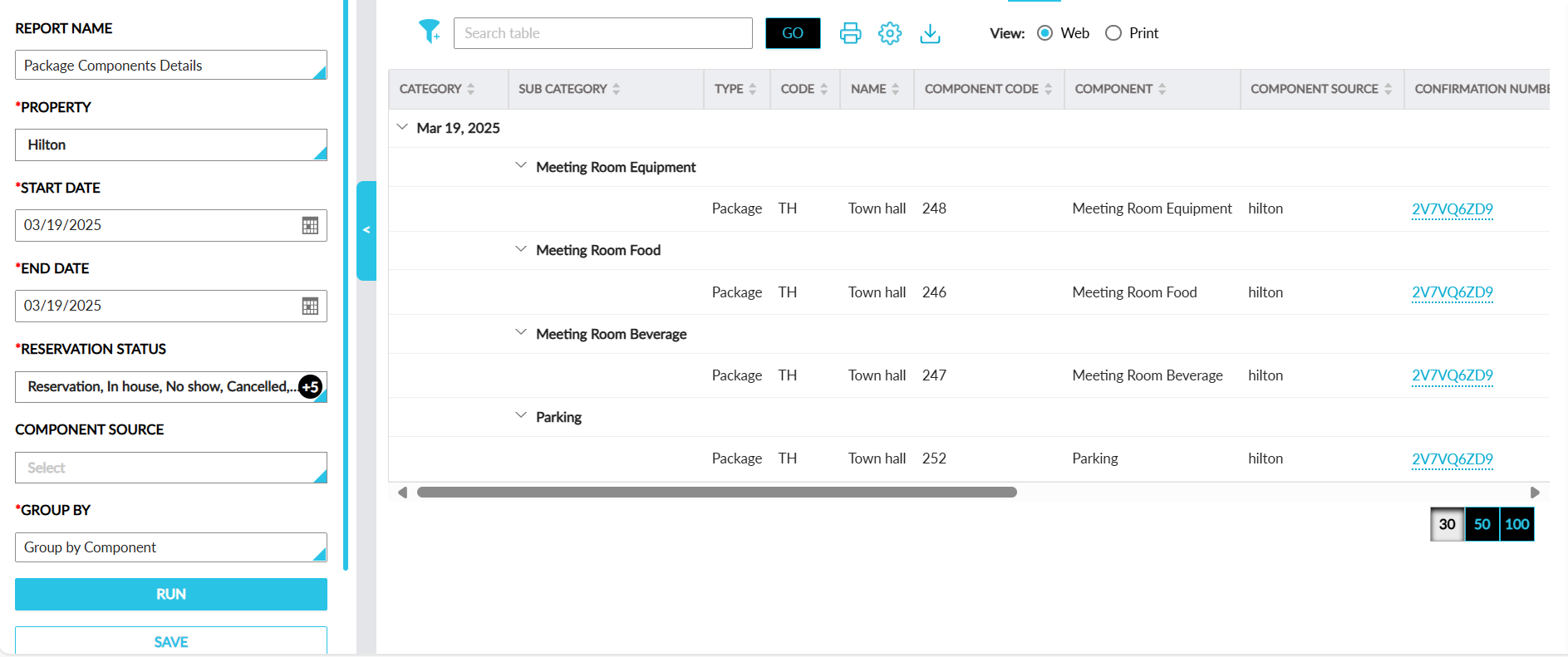
Report Fields
This report displays the following fields:
|
Field |
Description |
|---|---|
|
Category |
Displays dates from the selected date range on which package components are posted to reservations. |
|
Sub Category |
Displays records grouped by components or room number based on the option selected in the Group By drop-down list. |
|
Type |
Displays the type of the component - add on or package |
|
Code |
Displays the code of the Add on or package |
|
Name |
Displays the name of the Add on or package |
|
Component |
Displays the component name in the Add on or package |
|
Component Source |
Displays the name of the source through which the respective package component was booked.
|
|
Confirmation Number |
Displays the confirmation number of the reservation to which Add on or package is added |
|
Third-Party Confirmation |
The third-party confirmation number for the reservation if applicable. |
|
Guest Name |
Displays the guest name associated with the reservation to which Add on or package is added |
|
Arrival Date |
Displays the arrival date of the reservation to which Add on or package is added |
|
Departure Date |
Displays the departure date of the reservation to which Add on or package is added |
|
Status |
Displays the status date of the reservation to which Add on or package is added |
|
Room |
Displays the room number of the reservation to which Add on or package is added |
|
Building |
Displays the name of the building in which the room is located |
|
Quantity |
Displays the quantity of Add on or package components added |
|
Amount |
Displays the amount for the Add on or package components added |